Throttling and Debouncing

Both Throttle and debouncing are concept that help in performance optimization using limiting concept.
They ensure that subsequent redundant calls are handled optimally to avoid load and ensure optimal use of resources available. However they both are bit different in their approach.
Debouncing is like someone taking pause before replying to your question, whereas the throttling answering your question and then going for sleep for a while.
Debouncing
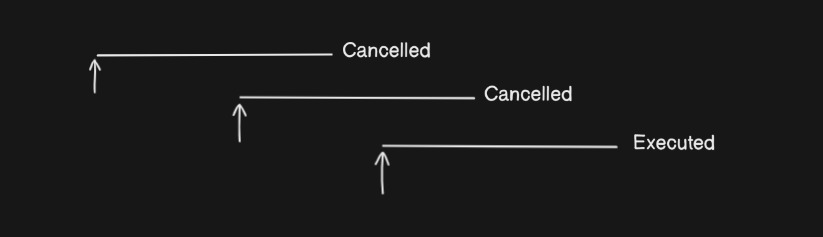
Debouncing ensures that a function is only executed after a specified period of inactivity. If the event is triggered again within that period, the timer resets. This is ideal for scenarios like search input fields, where you want to wait until the user has stopped typing before making an API call.
The diagram shows multiple incoming events (arrows). Each time a new event arrives before the waiting interval ends, the previous scheduled execution is cancelled. Only after a pause (no new events during the interval) does the function execute.
In a more specific language Lets say we have taken a 2 sec interval as standard, and a request is received then for a interval of 2 seconds starting when the request was received if another request is received then it will make the last request cancelled.
Now we will try and implement a debounce utility, which will take a function and a standard inactivity time interval in ms as parameter. To implement the utility lets specify the component needed,
A timer that start when the request is made.
A mechanism which ignore or clears old request if the timer is not elapsed when a new request is recieved
Execute the call once the time is elapsed.
On thinking this could be a potential solution
const makeCalls = ()=>{
    console.log(`making calls...`)
}

const myDebounce = function(fn, delay){
    let start = 0;  // a state variable which keeps the start time of last request was received
    return ()=>{
        //incoming request will be updating the state which is shared
        start = Date.now();
        //setTimeout ensure the function are executed at end of the interval
        setTimeout(()=>{
            //if condition ensure that only the last request is executed
            if(Date.now() >= start + delay){
                fn()
            }
        }, delay);
    }
}

const debouncedMakeCall = myDebounce(makeCalls, 300);
In above the start act as state variable which store the start time of the event, and a timeout start running and after a specified time the callback is executed. The if condition ensure that if any new event arrives within the specified inactivity period(delay) then the condition will fail as start would have been updated by new event.
A better implementation is using the clearTimeout method as shown below
const debounce = function(fn, d){
    let timer;
    return (...args)=>{
        clearTimeout(timer);
        timer = setTimeout(()=>{
            fn(...args);
        }, d)
    }
}
Throttling
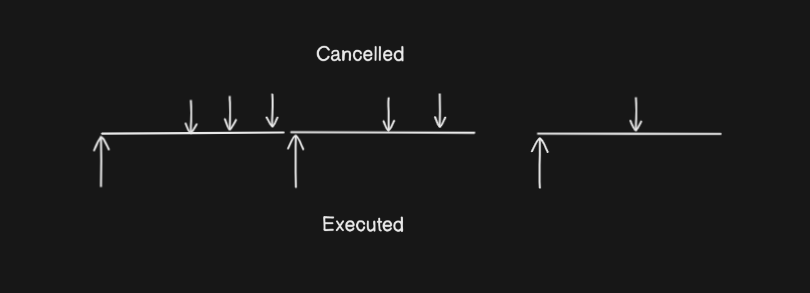
For throttling, clarify that after the function executes, all subsequent triggers within the interval are ignored until the interval passes.
The diagram shows that the first event triggers execution immediately, and all subsequent events within the interval are ignored (cancelled). After the interval, the function can execute again if a new event arrives.
To implement throttling we will be clarifying what need to be done
Execute the incoming request
Discarding the incoming request for a interval
We can acheive this using a state variable and setInterval as shown in below implementation
const throttle = function (fn, delay){
    //a state variable which decide if function is dormant
    let inThrottle = false;

    return (...args)=>{
        if(!inThrottle){
            fn(...args);
            //setting timer true to reject incoming request for interval
            inThrottle = true;
            //setting timer to false after time is elapsed
            setTimeout(()=>{inThrottle = false}, delay);
        }
    }
}
In above implementation the inThrottle variable is useful to identiy if the function is dormant after executing a function call. Once the function is executed the inThrottle is set to true to ignore other incoming events and is set to false only after the specified time interval is elapsed.
Summary
The discussion can be summarized in below table as.
| Aspect | Debounce | Throttle |
| Execution | After inactivity period | At most once per interval |
| Behaviour | Reset inactivity period timer on each trigger | Ignores event during interval |
| Use Cases | Search Input, Form Validation | Scroll, Resize, Repeated Button Clicks |